Where the local network fits
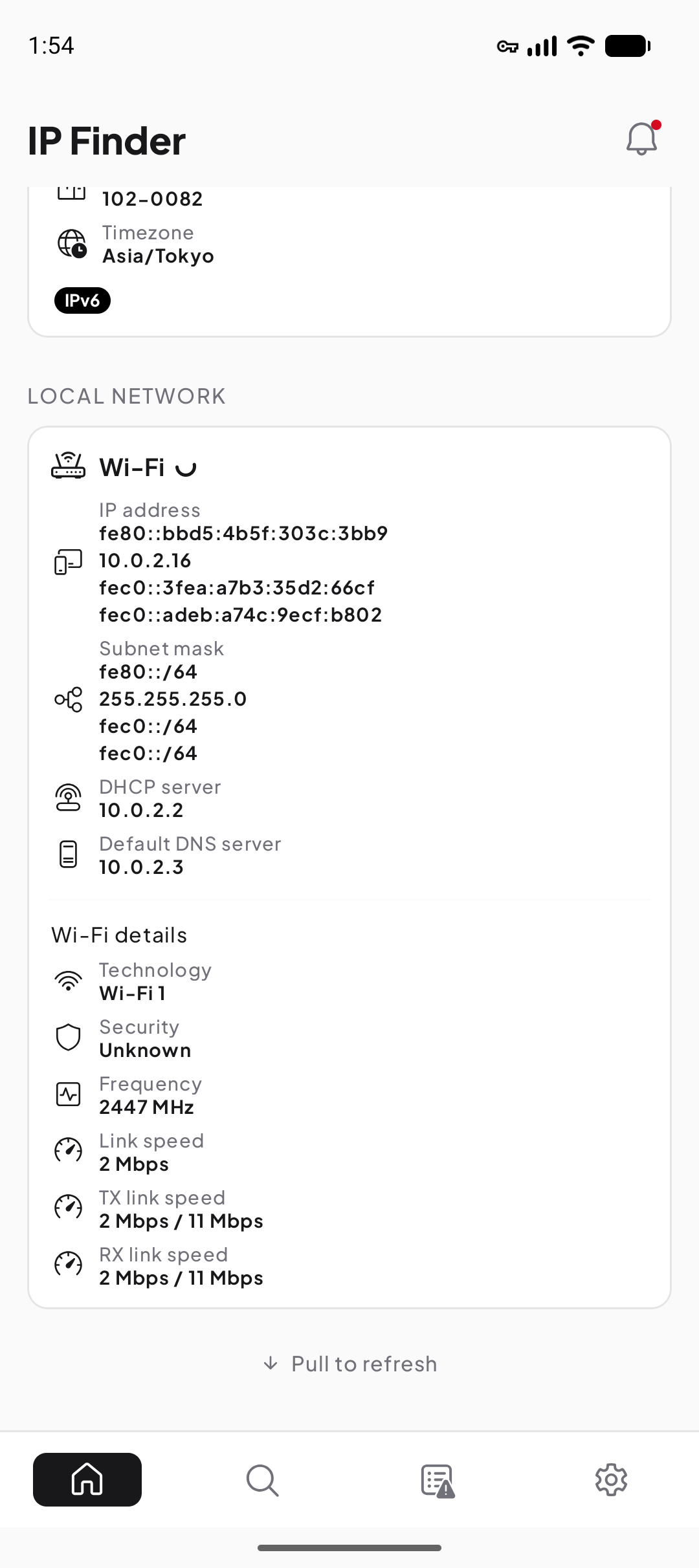
The local network is the part of the path close to your device: the Wi-Fi access point or wired LAN, nearby devices, and usually the router that forwards traffic outward. Local details help answer whether the phone received usable configuration before you investigate the provider or a remote service.
A public-IP checker observes the far side of this path. It normally cannot see the phone’s private Wi-Fi address because routers and provider systems route or translate traffic before it reaches the internet service.
Private address, gateway, subnet, and DNS
- Private or local IP
- The address used by the device in the current local scope.
- Default gateway
- The next-hop router used for destinations outside the directly connected subnet.
- Subnet or prefix
- The rule that tells the device which addresses are considered directly reachable on the local link.
- DNS configuration
- The resolver path the device or network provides for translating names into records.
These values work together. A valid local address without a usable gateway may allow nearby communication but not internet access. A working route with broken DNS can leave direct address connections available while names fail.
Continue with How to find public and private IP addresses on Android, compare it with Public vs private IP addresses, or use Learn IP and network basics for the next practical step.
A simple home Wi-Fi path
- Join the access point
The phone authenticates to Wi-Fi and receives or configures local network values.
- Decide whether a destination is local
The prefix tells Android whether to send directly on the link or use the gateway.
- Resolve the destination name
DNS provides an address record unless the app already has a usable cached answer.
- Send outward through the gateway
The router forwards or translates traffic toward the provider; the public source can differ from the phone’s local address.
The protocol details in this guide follow RFC 1918 — Address Allocation for Private Internets and RFC 4193 — Unique Local IPv6 Unicast Addresses; use those primary specifications when you need exact terminology or edge-case behavior.
Why Wi-Fi and mobile data look different
Wi-Fi exposes a nearby network managed by a router or organization, so Android can often show the access point and local configuration. Mobile data is managed inside the carrier network and does not necessarily expose the same fields or scopes to the user.
Switching between them can change public IPv4, IPv6 availability, DNS path, gateway behavior, and approximate IP location. Compare values only after labeling which interface was active.
First checks when Wi-Fi has no internet
- Confirm the device is connected to the intended Wi-Fi network, not only showing a saved network.
- Check whether Android reports a local address and gateway.
- Try the router or another local service if one is known and authorized.
- Compare another device on the same Wi-Fi to separate device-specific from network-wide failure.
- Check whether names fail while already known services still work, which can point toward DNS.
- Reconnect the network, then record which values changed before resetting broader settings.
Security and privacy limits
A private address is not a security guarantee. Local protections still depend on Wi-Fi authentication, router configuration, device updates, firewalls, application encryption, and who controls the network. Likewise, a public address does not mean a device is automatically reachable through intervening routers and firewalls.
IP Finder reports available configuration and focused observations. It does not scan nearby devices, change router settings, secure Wi-Fi, or determine who else controls the network.