IP address lookup
01 / 05
What an IP lookup shows
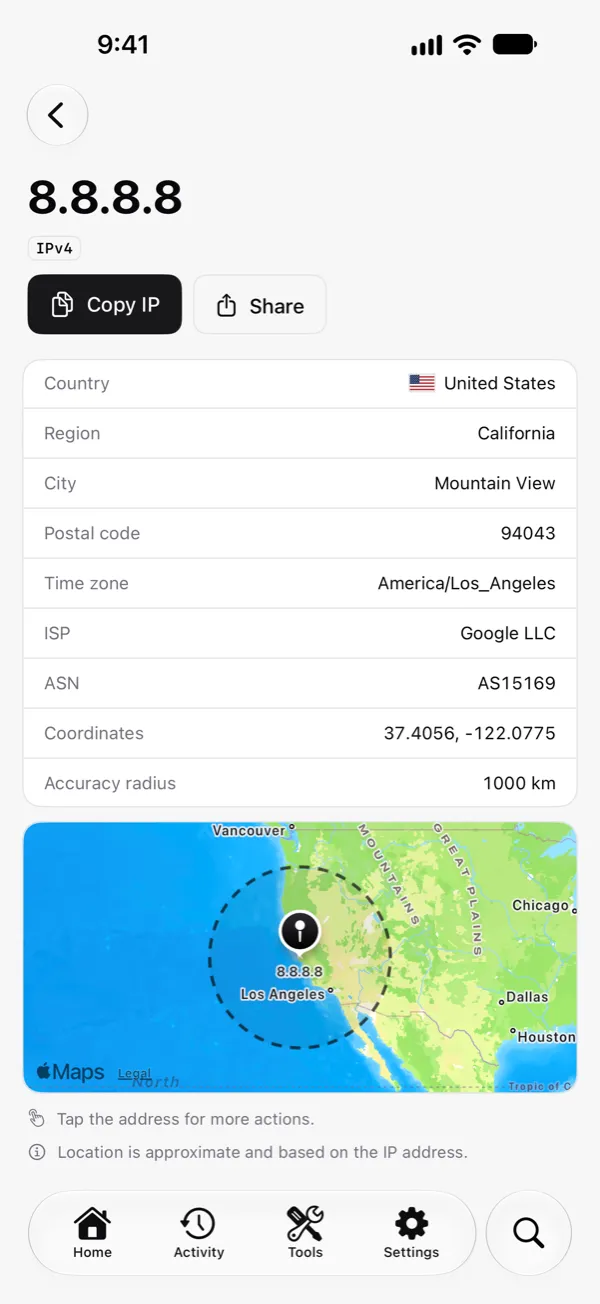
Paste an IPv4 or IPv6 address above and the lookup shows the network that announces it, its ASN and an approximate country, city and time zone. The data comes from databases of address blocks: each block records the network that announces it on the internet and the place where its users were last seen. The result describes the block the address belongs to, not a person and not a single device.
- Type
- Whether the address is public or falls in a special range, such as a private or carrier-grade NAT block, and whether it is IPv4 or IPv6.
- Country
- The country the block is registered or used in. It is the most reliable part of the result, usually right for home and office connections.
- Region and city
- An estimate of where users of the block connect from. For mobile networks and large providers it is often the city where the provider hands traffic to the internet.
- Postal code
- An approximate postal area for the block, useful as a hint. It is never a street address.
- Time zone
- The IANA time zone of the estimated place, with the current local time there.
- ASN and provider
- The autonomous system number and the organization that announces the block: an internet provider, a mobile carrier, a hosting company or a VPN service.
02 / 05
When to look up an IP address
Most lookups start with an address found somewhere else. The provider and ASN usually tell you more than the city does.
- A sign-in alert. Many services show the IP behind a new sign-in. If the provider is your own mobile carrier or VPN, it was probably you; a hosting company in another country is a reason to change the password.
- An email header. The Received lines list the servers that passed the message on. Large mail services usually leave out the sender's own address, so the lookup often names the mail provider, not the person.
- Server logs and firewall alerts. Requests from a hosting or cloud ASN are usually bots, crawlers or scanners; a home or mobile provider points to a person or a device on that network.
- A VPN check. Turn the VPN on and open this page: your own IP is looked up first, and the provider should be the VPN service, not your internet provider. How to check whether a VPN changed your IP and DNS covers the rest.
- A game or app server. A server in a distant country explains a high ping before you test anything else. More on that in ping, jitter and packet loss.
03 / 05
How accurate is the location?
The country is right for most addresses. The city is an estimate built from registry data, provider feeds and measurements, and it can be off by tens or even hundreds of kilometers. Mobile carriers, satellite internet and large providers often route many regions through one hub, so every user appears in that hub city.
A VPN, iCloud Private Relay, a corporate proxy or a cloud server moves the visible location to wherever that service connects to the internet. If your own result looks wrong, why an IP location can be wrong walks through the usual causes and what you can correct.
04 / 05
Addresses that have no public location
Some ranges are reserved for special purposes and never appear on the public internet. A lookup names the range instead of a place. The most common case is an address from a home or office network; public and private IP addresses explains why your phone shows one of these.
| Range | Addresses | What it means |
|---|---|---|
| Private | 10.0.0.0/8 · 172.16.0.0/12 · 192.168.0.0/16 | Used inside homes, offices and mobile networks; the same addresses are reused everywhere. |
| Carrier-grade NAT | 100.64.x.x – 100.127.x.x | Shared by a provider among many customers behind one public address. |
| Loopback | 127.x.x.x · ::1 | The device itself. Traffic never leaves it. |
| Link-local | 169.254.x.x · fe80::/10 | Assigned automatically when no router hands out an address. |
| Documentation | 192.0.2.0/24 · 198.51.100.0/24 · 203.0.113.0/24 · 2001:db8::/32 | Reserved for examples in books, manuals and this website. |
| Multicast | 224.x.x.x – 239.x.x.x · ff00::/8 | Delivered to a group of devices, not to one host. |
05 / 05
How to use the lookup
- Paste an address
Copy an IPv4 or IPv6 address from a server log, an email header, a firewall alert or a game server list, and paste it into the field.
- Look it up
Press Look up. The result shows the address with its approximate place and provider, then the type, the location details, the time zone and the ASN.
- Share the result
The page address changes to include the IP, so you can bookmark it or send the link to a colleague.
With the field empty, the page looks up your own public IP. The address you enter goes to IP Finder only to query the location database. It is not logged or stored, and each visitor can run a limited number of lookups per minute so the service stays free.
To understand where the data comes from and why two lookup services can disagree, read how IP address lookup works.
IP lookup
The same lookup on your phone
IP Finder for iPhone, iPad and Android looks up any address too, next to your own IP on every network you join.


FAQ